
Video Sales Tools: 5 Software Options Compared
By Ryane Tully · March 13, 2024
Video sales tools help teams record or generate sales videos, personalize them, host the viewing experience, hand assets into email or CRM workflows, and measure the right signals. The right sales video software depends on the job: one-to-one recording, scalable personalized outreach, demos, video sales letters, or broader video marketing.
Product and pricing details checked September 2026.
Which kind of video sales tool do you need?
The sales video software category includes screen recorders, personalized-outreach platforms, demo tools, video sales letter builders, and marketing-video suites. Choose the job first, then compare the complete workflow.
| Sales-video job | Best fit when | Poor fit when | What to evaluate |
|---|---|---|---|
| One-to-one sales recording | A rep needs to record a fresh screen or camera message for a specific account | The team needs hundreds of recipient-specific versions from one reusable pitch | Capture speed, editing, thumbnail, mailbox or CRM insertion, hosted page, alerts |
| Scalable personalized outreach | One coherent pitch can be reused across a segment while the surrounding experience changes by prospect | Every recipient needs a completely new spoken message | Data input, personalization model, review step, hosting, integration, sending handoff, usage unit |
| Product demos and walkthroughs | A seller needs a reusable explanation of a product, process, or proposal | The purchase requires a full interactive demo environment or live meeting platform | Capture, editing, chapters, access controls, viewer experience, follow-up path |
| Video sales letters (VSLs) | One persuasive video will sit on a landing or sales page for a broad audience | The main job is recipient-level outbound personalization | Script and editing workflow, page or funnel ownership, calls to action, testing, attribution |
| Broader video marketing | The team is producing campaign, social, brand, or lifecycle video across channels | The only requirement is a sales rep’s outbound handoff | Creation, brand controls, publishing destinations, collaboration, campaign analytics |
| Video email delivery | The hard problem is what appears in the inbox, where playback occurs, and how clients fall back | The team still has not chosen how videos are created or personalized | Preview type, hosted destination, client testing, sender ownership, email-related measurement |
Choose Pitchlane for scalable personalized outbound when one pitch fits a coherent prospect segment and the team already has an outreach tool. Choose a one-to-one recorder when every recipient needs a fresh manual recording.
What does this comparison cover?
Use this guide when the purchase spans video creation, personalization, hosting, sales-system handoff, sending, analytics, or team controls. Use a narrower guide when the decision is mainly about inbox behavior or campaign execution.
| Question | Use this page | Focus |
|---|---|---|
| Which video sales tools or sales video recording tools fit our workflow? | This guide | Tool categories, shortlist, workflow fit, and purchase evaluation |
| How should the video appear and play from an email? | Video email software guide | Email presentation, hosted playback, client behavior, sending, and dated free-plan or trial evidence |
| How do we run a video prospecting campaign? | Video prospecting workflow | Tactical process, examples, templates, safeguards, and follow-up |
| What does Pitchlane do? | Pitchlane homepage | Pitchlane’s product workflow rather than a neutral category comparison |
| Do we need video sales letter software? | Start with the category matrix above | VSL production centers on scripting, editing, funnel ownership, calls to action, testing, and attribution |
For teams comparing video prospecting tools that integrate with email and CRM, trace the complete handoff: how prospect data enters, what the video product returns, which system sends, and where clicks, plays, replies, meetings, and pipeline outcomes are recorded.
Quick comparison: five recording and outreach options
The five products below cover sales recording, video messaging, hosting, and personalized outreach. Interactive demos, VSL production, and broad video marketing require different shortlists. Compare each vendor with the same sample contacts, message, destination, sending system, and reporting requirements.
| Tool | Product scope | Sending handoff | Buying check |
|---|---|---|---|
| Pitchlane | Record your pitch once, personalize for every lead | Pushes into Instantly, Smartlead, lemlist, HubSpot, Apollo, and related workflows | Segment fit, review process, chosen integration, and which system owns each metric |
| Loom | Screen and camera recording; Variables is listed as Beta on paid plans | Depends on the selected sales workflow | Data input, Variables limits, and fit for list-based sales use |
| Vidyard | Recording, hosting, sharing pages, analytics, and revenue-tool integrations | Product- and plan-specific | Creation, sharing, analytics, permissions, and integration path |
| Sendspark | AI voice or name personalization, dynamic backgrounds, and personalized thumbnails | Product- and plan-specific | Dynamic Video Minutes, workflow tasks, seats, and plan limits |
| BombBomb | Recording and video messaging across Gmail, Outlook, browser extensions, and mobile apps | Product- and plan-specific | Email or CRM path, analytics, administration, and package limits |
Official sources: Loom product and pricing; Vidyard product and pricing; Sendspark video emails and pricing; BombBomb product and pricing.
For the tactical process, examples, templates, and qualified recruiter-to-candidate use cases, read our video outreach and prospecting guide.
What should you evaluate in sales video software?
A feature checklist can hide the most important break in the workflow. Evaluate the complete system from prospect data to rep follow-up, and write down which product owns each step.
1. Recording or generation
Identify whether the product is a camera/screen recorder, upload-and-host tool, AI-generation workflow, or a combination. Ask how much recording a rep must do for ten, 100, and 1,000 recipients. A process that works for five accounts may fail at campaign scale.
2. The exact personalization model
“Personalized video” can describe several different changes:
- email copy or subject line;
- video title;
- thumbnail;
- hosted viewer page;
- website or contextual background;
- a spoken variable;
- a separately recorded video.
These are not equivalent. Require the vendor to show exactly what changes, where the recipient sees it, what data is required, and whether a human records each version.
3. Hosting and the landing page
Document where the full video opens. Check mobile behavior, branding, privacy, calls to action, and domain requirements. A good thumbnail does not prove the destination or plan-specific viewer controls fit your campaign.
4. Integrations and data direction
An integrations logo does not establish a complete workflow. Map how contacts enter, what the video product returns, which direction data moves, and whether the connection is native, CSV-based, API-based, webhook-based, or routed through an automation service. Test the actual integrations your team uses, such as Instantly, Smartlead, lemlist, HubSpot, or Apollo.
5. Sending handoff
Ask a simple question: which system presses send? A video tool may insert a preview into Gmail or Outlook, pass an asset to a sequencer, export links and thumbnails, or send from its own workflow. The CRM, mailbox, or sales-engagement platform may still own sequences, sender controls, replies, and opportunities.
6. Analytics signal ownership
Do not flatten every event into “engagement.” Separate:
- preview click;
- video play;
- unique viewer;
- watch time or completion;
- call-to-action click;
- reply;
- booked meeting;
- pipeline outcome.
Then identify the system of record for each signal. A view is useful context, but it does not prove that the video caused a reply, meeting, or sale.
7. Team controls
For a multi-rep rollout, test templates, shared libraries, permissions, review steps, reporting, and required security controls on the proposed plan. Ask an administrator and a rep to complete the setup before committing.
8. Scale and the pricing unit
Video software can be priced by seats, videos, credits, generated minutes, workflow tasks, storage, contacts, or a custom package. Model the bill with your real list size and retry rate. Do not rank unlike units from cheapest to most expensive without calculating the full workflow.
Video sales tool reviews by job
Each product serves a different sales-video job. Use the trial question in each section to compare the same workflow across vendors.
Pitchlane: personalized outbound at scale
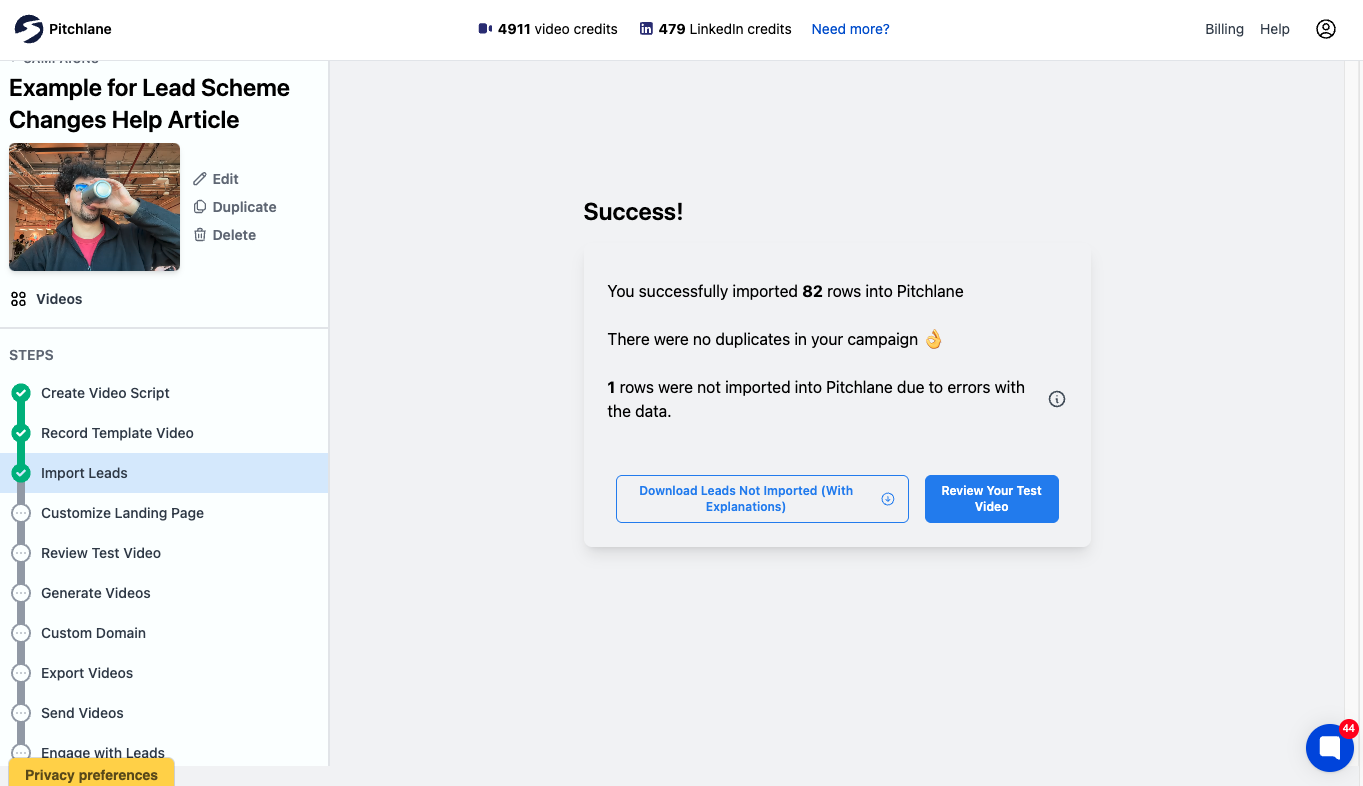
Pitchlane’s documented workflow is to record your pitch once, personalize for every lead. Campaign setup proceeds through Import Leads, Customize Landing Page, and Review Test Video before handoff into a connected outreach workflow.
Pitchlane pushes into Instantly, Smartlead, lemlist, HubSpot, Apollo, and related workflows. The connected outreach platform handles delivery and follow-up; the CRM or other system of record should own the business outcome.
Pitchlane lead import reports accepted and rejected rows. In the documented 83-row example below, 82 rows were accepted and one was flagged for a data error; the rejected-row details were available to download for correction.
Evaluate this workflow when one spoken pitch remains relevant to a coherent segment. Use separate scripts for unrelated roles, even when the software can produce more versions.
Choose Pitchlane when a reusable pitch fits a coherent segment and the CRM or sequencer will remain the sending system. Choose a one-to-one recorder when each recipient needs a newly recorded message.
Trial question: Can the team import a real segment, review a test video, pass the result into its existing sending workflow, and identify who owns clicks, replies, meetings, and opportunities?
Explore the personalized video outreach platform, Pitchlane pricing, or the wider guide to personalized outreach at scale.
Loom: internal async video and screen recording
Loom belongs in this comparison because “sales video recording software” often means screen and camera recording with async sharing. Variables is listed as Beta on paid plans.
Choose Loom when recording and sharing are the main jobs. For list-based personalization, run the Variables workflow with your data, selected plan, and sending tool.
Trial question: How does prospect data enter the Variables workflow, what changes for each recipient, and how does the finished asset reach the sender?
For the narrower outbound decision, see our Loom alternative for sales outreach evaluation.
Vidyard: recording, hosting, and broader revenue workflows
Vidyard combines recording, hosting, sharing pages, analytics, and revenue-tool integrations, with the available workflow depending on product and plan. Choose it when the team needs hosting and revenue-tool connections alongside recording.
Test creation, hosting, sharing, analytics, permissions, and integration on the proposed plan. Record whether Vidyard or another system owns the outbound message, reply, meeting, and pipeline data.
Trial question: Which quoted product and plan provide every required step, and what must remain in the CRM or sales-engagement platform?
Sendspark: generated personalized sales video
Sendspark offers AI voice or name personalization, dynamic backgrounds, and personalized thumbnails. Its pricing uses limits that include Dynamic Video Minutes and workflow tasks.
Compare both workflow and workload. Ask how contact data enters, what changes in the video and destination, how the preview reaches the message, and which events return to the sales system. Calculate minutes, tasks, seats, and limits for a real campaign rather than comparing plan names.
Trial question: What does a representative campaign consume, including failed rows, retries, reviews, generated minutes, workflow tasks, seats, and integration requirements?
BombBomb: one-to-one video messaging across common rep surfaces
BombBomb supports recording and video messaging across Gmail, Outlook, browser extensions, and mobile apps; analytics and team controls depend on package. Choose it when reps need to record and send from the tools they already open each day.
Test the proposed package. Ask a rep to use the real mailbox or CRM path and an administrator to inspect reporting and team controls. Document where the video opens and which events return to the system reps monitor.
Trial question: Which recording, sending, viewer, analytics, and administration steps are included in the proposed package?
Where Pitchlane fits in the sales stack
Pitchlane’s clearest fit is a sales team with an existing prospecting and outreach stack that wants one reusable recording personalized across a coherent segment, reviewed, and handed into a connected workflow.
The stack can be mapped as follows:
| Layer | Primary job |
|---|---|
| Prospect data | Select the right accounts and contacts, then provide accurate variables |
| Pitchlane | Create and personalize the video asset and hosted experience |
| Outreach tool or mailbox | Control sender setup, sequence timing, delivery, and replies |
| CRM or system of record | Own contacts, opportunities, follow-up, and business outcomes |
Use Pitchlane for reusable personalized outreach across a coherent segment. Use an async collaboration product for internal walkthroughs and comments, a one-off recorder for newly recorded recipient messages, or a support platform when helpdesk routing and account history drive the workflow.
For process guidance beyond tool selection, read our video prospecting workflow.
How are video sales tools different from video email software?
Video sales tools cover the wider workflow from creation and personalization through hosting, handoff, sending, analytics, and team controls. Video email software narrows the decision to what appears in the message, where playback occurs, how email clients handle previews or video, which system sends, and which email-related events can be measured.
If inbox presentation and client fallback are the main decision, use the dedicated video email software evaluation guide. If the harder question is how video creation, prospect data, personalization, sending, and follow-up work together, evaluate the broader sales-video workflow here.
Can you automate personalized sales video outreach?
Yes. Teams can automate generation or personalization and the handoff into a sending workflow. Keep human approval for the segment, pitch, variables, sending rules, and response process, with verified input data, exception handling, a test-video review, sender controls, and measurement ownership.
A safe sequence is:
- choose a coherent segment and verify its data;
- create a reusable pitch that fits that segment;
- define exactly what changes per recipient;
- review representative and exception cases;
- hand approved assets into the outreach platform;
- measure views separately from replies, meetings, and pipeline.
Direct answers to adjacent sales-video questions
What is the best sales video recording software?
For a few high-value accounts, the best fit is a fast camera or screen recorder with editing and mailbox or CRM insertion. For outreach across hundreds of prospects, choose a platform that reuses one recording while adding recipient-level context, review, hosting, and a clear sending handoff. Compare the pricing unit against your actual list size.
What is sales video recording software?
Sales video recording software lets a rep capture camera, screen, or both for a prospect-facing message, demo, proposal, or follow-up. Recording is only the first layer. A complete sales workflow may also require editing, hosting, a thumbnail or preview, email or CRM insertion, viewer signals, permissions, and a separate system for sending and follow-up.
What software do salespeople use with video?
Salespeople commonly need several layers rather than one all-purpose product: a source of prospect data, video creation or personalization, a hosted destination, an email or sales-engagement system, and a CRM or other system of record. The video tool should have a defined boundary with each layer; an integration logo alone does not prove that data, sending, replies, and opportunity outcomes move both ways.
Which platform is best for video marketing?
For campaign, social, brand, and lifecycle video, choose a marketing platform built around editing, brand controls, collaboration, multichannel publishing, calls to action, and attribution. For sales outreach, choose a recorder or personalized-outreach platform with a clear mailbox, sequencer, or CRM handoff.
What is Vidyard used for?
Vidyard is used for recording, hosting, video sharing pages, analytics, and revenue-tool integrations. The selected product and plan determine the available creation, hosting, sharing, permissions, analytics, and integration workflow.
What is the difference between a sales video message and a video sales letter?
A sales video message is commonly sent to a prospect or account through email, a CRM, LinkedIn, or another outreach channel. A video sales letter is usually a one-to-many persuasive video on a landing or sales page. A VSL purchase therefore emphasizes scripting, editing, page or funnel ownership, calls to action, testing, and attribution rather than recipient-level personalization and rep follow-up.
Decision checklist
Choose the sales-video job first, then make every shortlisted vendor prove the same end-to-end path.
- Choose an async recorder when the main job is internal explanation and collaboration.
- Choose a one-to-one recorder when every prospect needs a fresh manual message.
- Choose a video-email workflow when inbox presentation and client fallback are the hard requirements.
- Evaluate Pitchlane when the team wants one reusable pitch personalized across a coherent segment and handed into its existing outreach stack.
- Require written answers for data input, personalization, hosted destination, sending ownership, analytics ownership, team controls, plan limits, and pricing units.
For the surrounding system, compare sales outreach tools, email prospecting tools, and approaches to video personalization at scale.